Xeroom Version 3.2.9 – Release Notes
14th March, 2026
Fixes:
1. Coupons when % discounts are used on multiple product items – “Line total does not match expected total error”.
2. Invalid scope connection error - Xero scopes new authorisation protocol with granular scopes implemented. Scopes are Xero’s way of limiting API access to certain accounting areas eg invoice, payments, contacts.
3. Summary orders - Don't show on WC menu if not used.
4. "An error occurred in Xero." – The user is given “Xero API validation error” and the Xero logs show this is from the contactID.
5. Klarna via Stripe invalid account.
Enhancements:
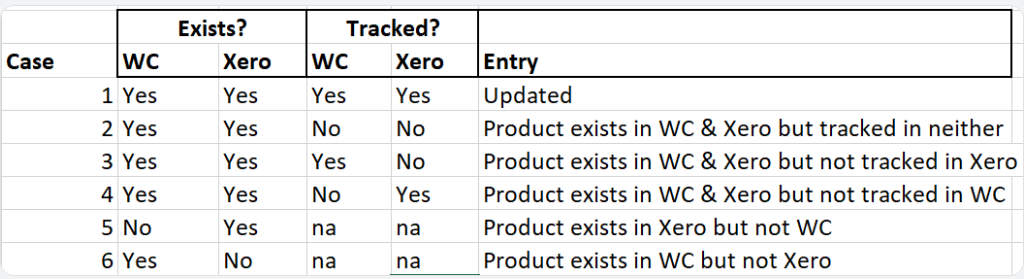
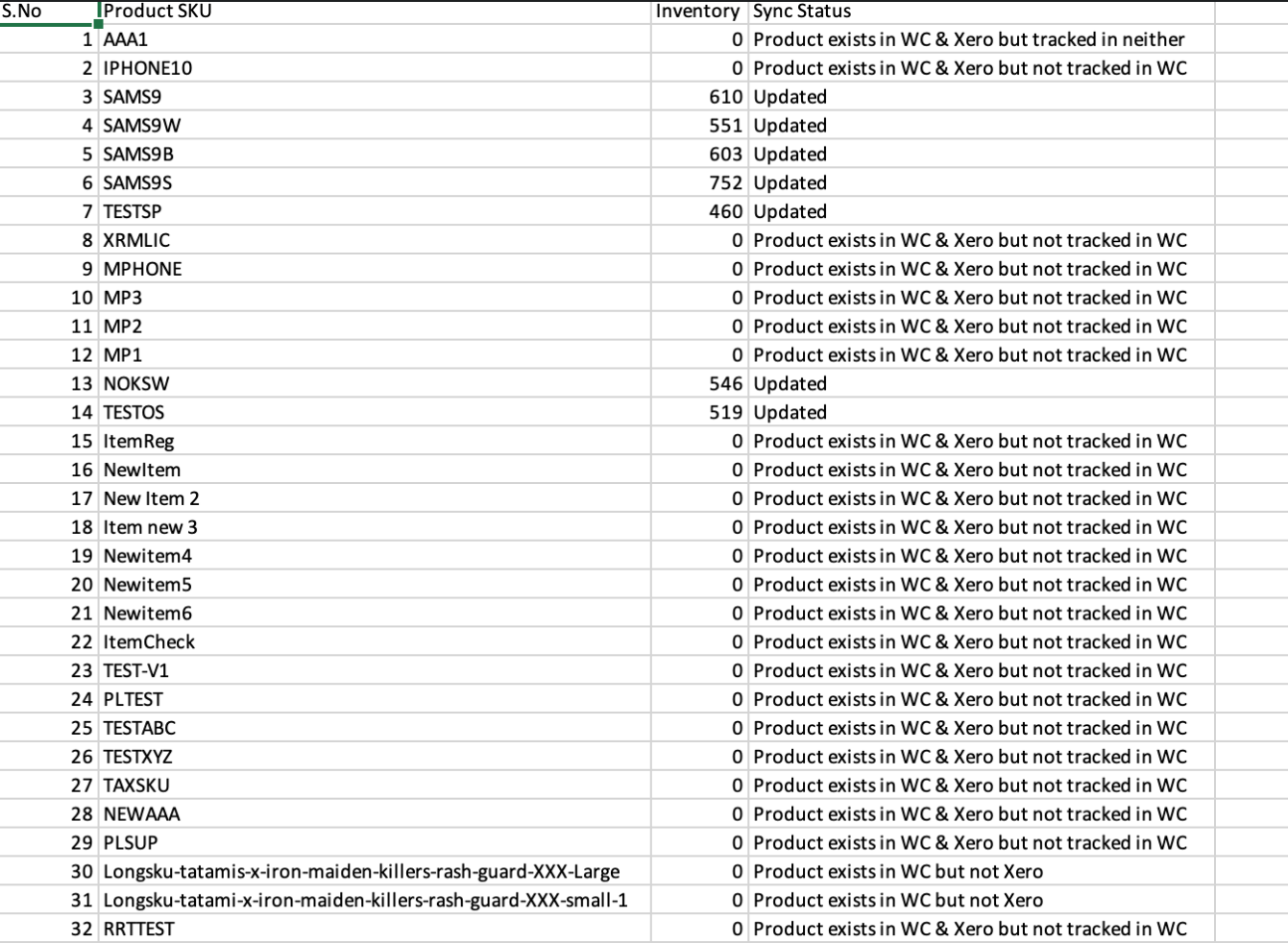
1. Inventory synch log - Improved entries covering all 6 cases for WC and Xero product existence and tracking status's.
2. Connection to Xero improvements – We have created two new functions in Xeroom that can be activated by user customisable filters in the form of code snippets. These can be added to your site in three ways: 1) via a small simple plugin; 2)With a WordPress snippet management plugin or 3) just add to your functions.php file – Below is an example of a plugin – name the file Xeroom-snippets.php zip it up locally and then install it on your plugins page.
a) Expand Xero scopes - To avoid the “Invalid scope for client” error, the default connection that Xeroom uses requests a minimal safe scope set of only what it actually needs for invoices, contacts, payments and attachments. If you require additional scopes for your integration then these can be accessed by using filter.
<?php
/**
* Plugin Name: Xeroom Snippets ABC Website
* Description: This provides snippets for use with Xeroom on ABC Website
* Author: Peter Lloyd
* Version: 1.0
* Date: 13th March 2026
*/
/* Force the Xero URI redirect to use the wholesale subdirectory*/
add_filter( 'xeroom_oauth_scopes', function( $scopes ) {
// Minimal granular: identity + settings/contacts/attachments/invoices/payments
return 'openid email profile offline_access accounting.settings accounting.contacts accounting.attachments accounting.invoices accounting.payments';
} );
add_filter( 'xeroom_oauth_redirect_uri', function() {
return 'https://yourwebsitename/subdirectory/?rest_route=/xeroom/v2/oauth_callback';
} );
?>
b) Use of subdirectory – If you use a domain subdirectory then you need to force Xero to use the correct URI. If you host your site in a subdirectory of the main domain eg https:/yourwebsitename/subdirectory/ then the Xero app will have problems. This function and filter ensures that the OAuth callback always lands on the correct WordPress REST endpoint thus avoiding the “invalid URL” xero connection error.
Xero Scopes are Changing – More detail
Xeroom has been updated to fix the “Invalid scope for client”/“unauthorized_client” errors and align with Xero’s recent “Scopes are changing” update.
What changed at Xero?
Xero is moving from broad OAuth scopes to more granular ones in order to reduce server load and the possibility for errors or security breaches:
- Apps created on or after 2 March 2026 - can only use the new granular scopes.
- Apps created before 2 March 2026 - can keep using broad scopes until September 2027 (and will get granular scopes by the end of April 2026).
What we have changed in Xeroom:
- Default scopes
The plugin now requests Xero’s new granular scopes by default, so new Xero apps (March 2026 or later) can connect without “Invalid scope for client”.
- OAuth scope type setting
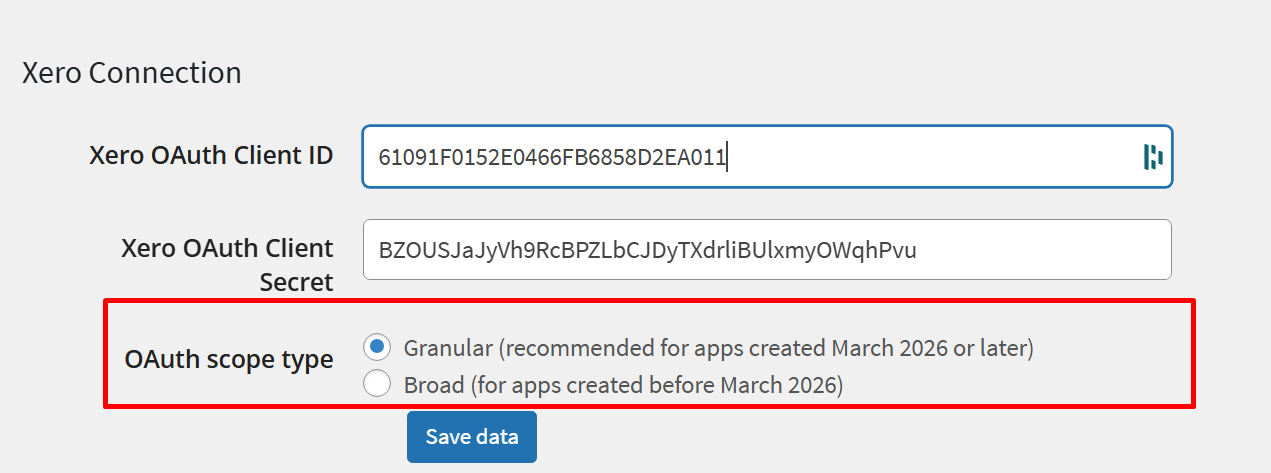
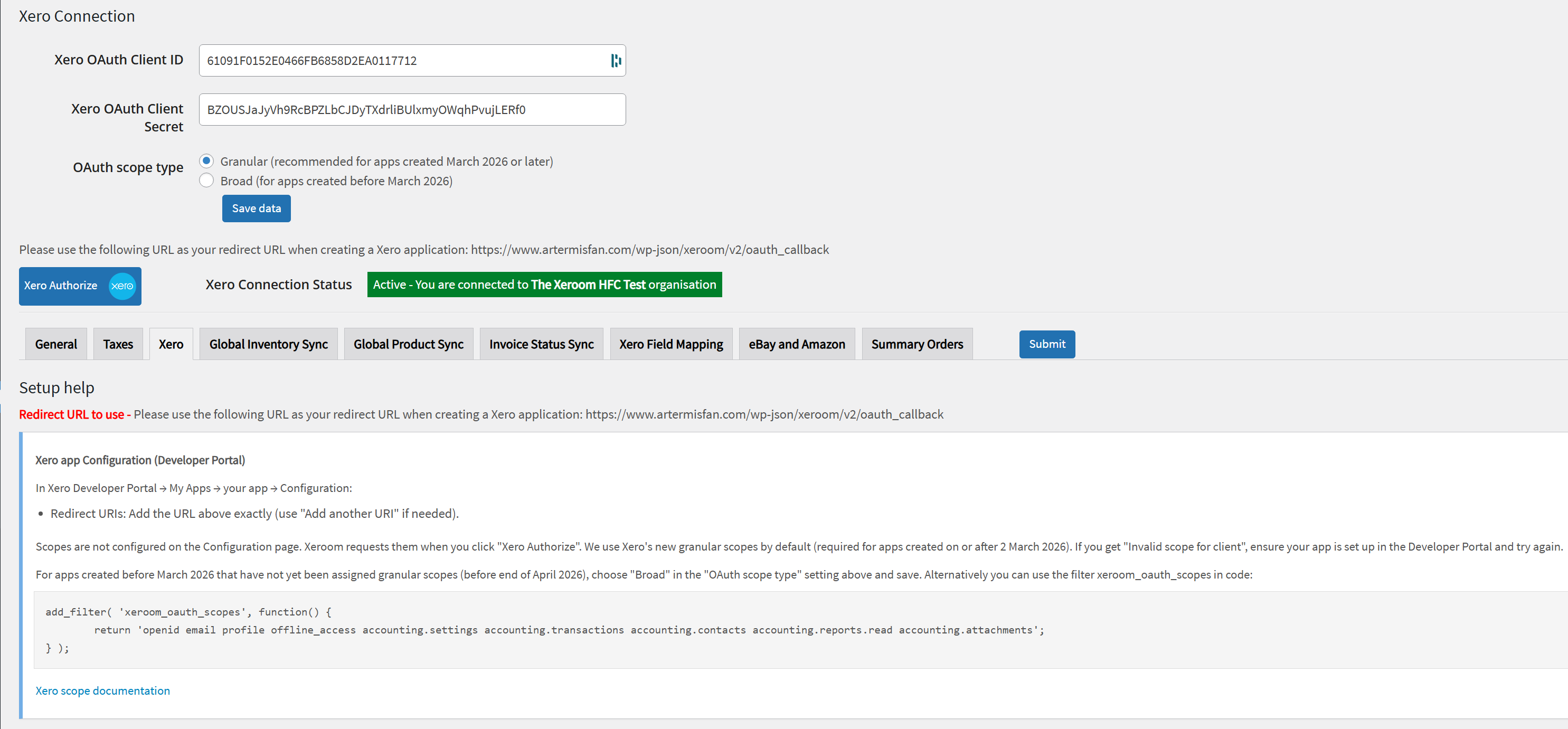
In the Xero connection settings, you’ll see a new option: “OAuth scope type”:
- Granular – for apps created March 2026 or later (recommended default).
- Broad – for apps created before March 2026, if you still see scope errors.
- Choose the one that matches when your Xero app was created, click Save data, then try Xero Authorise again.
- Redirect URI and “Scopes” in Xero
There is no “OAuth 2.0 scopes” (or “Scopes”) section on the Xero app Configuration page. Scopes are not configured there; the plugin sends the required scopes when you click Xero Authorise.
You only need to ensure the Redirect URI in Xero matches exactly what the plugin shows (including subdirectory if your site uses one).
- Help text and troubleshooting
The settings page now includes short instructions and a link to Xero’s scope documentation (https://developer.xero.com/documentation/guides/oauth2/scopes/). If “Invalid scope for client” appears, the on-page troubleshooting will suggest choosing Broad in the OAuth scope type when your app was created before March 2026.
What to Change in your Xeroom setup?
- New Xero app (March 2026 or later): Use the plugin as usual. Keep the OAuth scope type on Granular (default). Ensure the Redirect URI in the Xero app matches the one configured in the plugin. Then the Xero Authorise process should work.
- Existing Xero app (before March 2026): and you get “Invalid scope for client”: In the Xero connection settings, set the OAuth scope type to Broad, click Save data, then run Xero Authorise again.
- Subdirectory or custom redirect URL: If your site runs in a subdirectory (e.g. /wholesale/) or you use a custom redirect URL, that URL must be added in the Xero app’s Redirect URIs exactly as shown in Xeroom and the filter snippet filter invoked (see above) if you need to force a specific redirect URL.
Was this article helpful?
That’s Great!
Thank you for your feedback
Sorry! We couldn't be helpful
Thank you for your feedback
Feedback sent
We appreciate your effort and will try to fix the article